


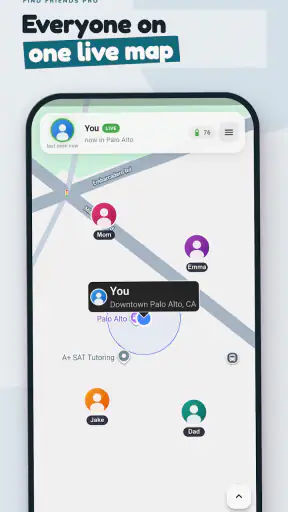
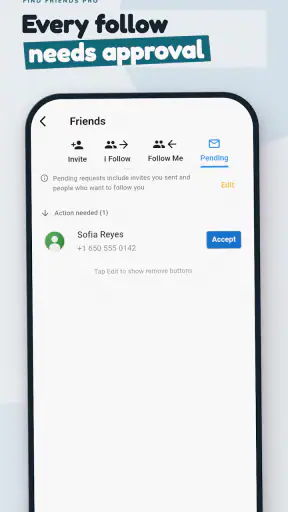
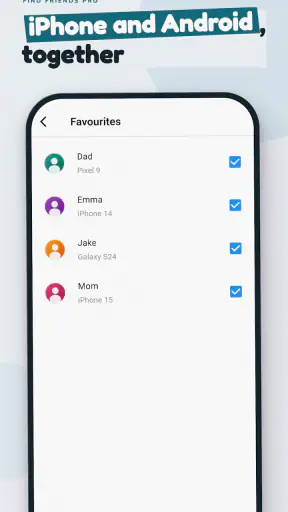
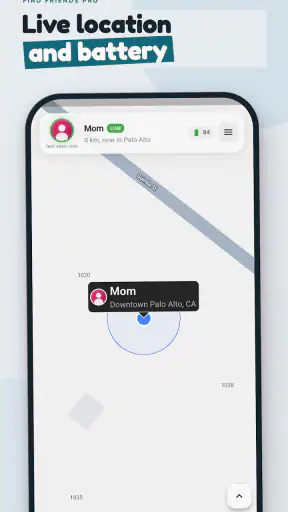
I tried Find Friends Family Locator as a practical family location-sharing app rather than treating it like a simple map utility. Its purpose is straightforward: help people share where they are and find friends or relatives from a phone. That focus makes it potentially useful in everyday coordination, but it also means the quality of the experience depends heavily on whether everyone involved is comfortable sharing location information.
This is a free parenting app from synchronise, rated for Everyone, and it runs on Android devices using version 7.0 or later. The app has passed the one-million-install mark and holds an average rating of 3.5 from around three thousand ratings, with a little over two hundred written reviews. Those figures suggest a widely tried service with a mixed, rather than universally enthusiastic, reception.
How Find Friends Family Locator fits into real family routines
A simple idea with a very specific purpose
The app is built around two actions I would expect from its name: sharing my location and finding people I know. That makes it different from a general-purpose messaging app, where location sharing is usually just one option among many. Here, the location task is the reason to open the app in the first place.
I can see the appeal for parents coordinating school pickups, partners trying to meet after work, or friends gathering in a busy public place. Instead of sending a series of messages such as “Where are you now?” and “How far away are you?”, a location-sharing tool can reduce that back-and-forth. It is especially handy when plans are changing and a quick look is more useful than another phone call.
At the same time, I would not treat a location marker as a substitute for communication. A map can show where a phone is being reported, but it does not explain why someone is there, whether they are safe, or whether the person carrying the phone is actually the one you expect. That distinction matters in a parenting context.
What the free access means for a new user
Find Friends Family Locator is free to install and use as an entry point, which makes it easy to test with a family group before committing money. The app includes in-app purchases ranging from $2.99 to $119.99 per item. Because those purchases cover a wide span, I would inspect the purchase screen carefully before confirming anything and decide whether the free experience already handles the routine you need.
That is the most important cost distinction here: downloading the app does not require an upfront purchase, while optional paid items can change the overall value depending on what you choose. I would not assume that paying automatically makes location sharing more accurate or more suitable for a particular family. The sensible approach is to start with the free access, establish whether everyone can use it comfortably, and only then consider a paid option if it solves a clearly identified need.
For a household that only wants occasional coordination, free access may be enough. A family that expects to depend on the app every day should look at the purchase details in context rather than focusing on the lowest advertised price. The highest listed item is substantial compared with a casual utility purchase, so a rushed tap could turn a simple trial into an expensive decision.
A realistic school-day scenario
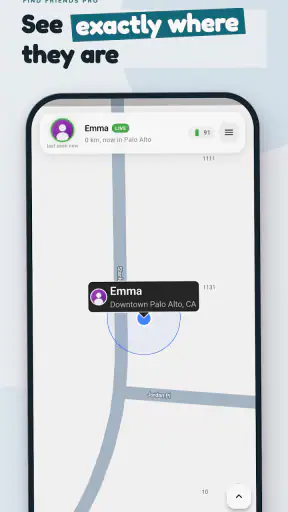
Imagine a parent finishing work while a child is leaving an activity. The parent wants to know whether the child is still at the venue, walking toward the pickup point, or already on the way home. With a location-sharing app, the family can check the shared position before deciding whether to call. That can be useful when the parent is driving and needs to avoid a long conversation.
There is a practical habit I would recommend in this situation: agree in advance on when location sharing is expected and when it can be turned off. Without that conversation, one person may regard the app as a safety tool while another experiences it as constant monitoring. The technology cannot resolve that disagreement; the family needs a clear rule first.
I would also use a second channel for anything urgent. If a child has arrived somewhere safely, a short message or call is still better confirmation than silently watching a map. The app works best as a coordination layer, not as the only line of contact.
Useful workflows beyond simply opening the map
One non-obvious strength of a dedicated locator is that it encourages a shared routine. Instead of asking each person to explain their position from scratch, a family can use the same place to check in before pickups, trips, or meetups. That consistency may save time, especially for people who dislike composing messages while moving between locations.
A second useful workflow is to check the map before sending a question, then ask only what the map cannot answer. If someone appears near the destination, I can ask whether they are ready rather than asking where they are. If the position has not changed, I can call instead of assuming the person is travelling. This makes the app a prompt for better communication rather than a replacement for it.
A third trade-off is that a location-sharing group needs maintenance. People change phones, travel, alter their routines, or simply stop wanting to participate. I would periodically review who is included and whether the sharing arrangement still makes sense. Leaving old contacts or outdated expectations in place can create confusion and privacy discomfort.
Where it differs from ordinary alternatives
The usual alternative is a messaging app with an occasional location-sharing option. That approach is often better when location is needed only once, such as meeting a friend at a concert or sending a temporary position during a journey. A dedicated family locator is more appealing when the same group needs location context repeatedly and wants that purpose kept separate from a busy chat thread.
Another alternative is simply calling or texting. That remains the better choice when the situation needs an explanation, a confirmation, or a quick decision. A phone call can reveal that someone is delayed, has lost their way, or needs help; a map alone cannot provide that context.
Find Friends Family Locator also should not be confused with a full parental-control suite. Its central identity is location sharing and finding people. Parents looking for screen-time controls, content filtering, detailed device management, or broader digital-safety tools would be better served by an app designed specifically for those jobs.
Privacy and trust are part of the user experience
Location tools are never just technical products. They affect relationships. I would introduce this app to older children and other family members by explaining what it is for, when it will be used, and who can see the shared location. That conversation is not optional in my view; it is part of setting the app up responsibly.
For teenagers, a clear agreement can work better than vague supervision. For example, a family might use sharing during travel or after-school journeys but agree that everyone can discuss changes to the arrangement. This keeps the app connected to a practical purpose instead of turning it into an invisible test of trust.
I would also avoid making decisions based on a single map update. Phones can be left behind, battery levels can become an issue, and a displayed position may not reflect the person’s current situation. When the stakes are high, contact the person directly or use the appropriate emergency channel rather than relying on the locator alone.
Performance expectations and everyday friction
The app’s job sounds simple, but location services are inherently dependent on the phones and connections involved. A family should expect occasional friction when a device is unavailable, a person has not shared their location, or the displayed position does not update as expected. I would test the arrangement during an ordinary, low-pressure day instead of waiting until a child is late or a pickup has gone wrong.
That test should answer practical questions for your household: Can everyone find the right group? Does each person understand when to share their position? Does checking the map actually reduce messages, or does it create more questions? These are more useful measures of success than the app’s name or its download count.
The current version is 138, and the app was released on July 22, 2019. For me, that history makes it worth checking the experience on the actual phones a family uses rather than assuming that an older device will behave exactly like a newer one. The minimum operating-system requirement is Android 7.0, so compatibility is reasonably broad for Android users with supported software.
Who is likely to get the most value
I think the strongest audience is a small family or friend group that regularly needs to coordinate movement. Parents managing pickups, couples meeting in different parts of a city, and friends travelling together can all understand the benefit quickly. The app is particularly suitable for people who want a location-focused tool instead of adding another feature to an already crowded social or messaging app.
It can also help households where not everyone communicates in the same way. One person may prefer checking a map while another prefers sending a message. Used together, those habits can reduce unnecessary calls without removing direct contact when it matters.
The free entry point is valuable for this audience because it allows a group to discover whether the habit fits before spending money. I would invite only the people who genuinely need the information, explain the arrangement, and use the first few days to see whether it makes coordination easier or merely adds another thing to monitor.
Who should probably skip it
I would skip it if you only need one-time location sharing. In that case, a familiar messaging app may be quicker and less demanding for everyone involved. I would also look elsewhere if your main goal is comprehensive parental control, because a location tool is not a complete answer to every parenting concern.
People who are uncomfortable with ongoing location sharing should not feel pressured to use it simply because it is popular. A tool that creates arguments or anxiety is poor value even when the download itself is free. The same applies to families that cannot agree on who should see locations and under what circumstances.
I would be cautious about choosing it as the sole solution for high-risk situations. A locator can support a safety plan, but it should not replace emergency services, direct contact, or an agreed procedure for when someone does not respond. That is a limitation of the category as much as of this particular app.
How I would decide whether to pay
My approach would be deliberately conservative. I would first use the free access for the exact routine I care about: perhaps school pickup, commuting, or meeting during a trip. I would note whether the app actually saves time and whether every participant understands it. Only after that would I examine an in-app purchase.
The purchase range means the decision deserves attention. A low-cost item might feel reasonable for a small convenience, while a much larger purchase needs a clear, continuing benefit. I would read the wording on the purchase screen, check whether it is a one-time item or part of an ongoing arrangement, and avoid paying merely because a feature sounds reassuring.
Paid value should be judged by a specific improvement, not by the assumption that premium always means essential. If the free workflow already lets your family coordinate comfortably, keeping the app free may be the best outcome. If a paid option is the only practical way to support the routine you have tested, then the cost can be considered in relation to that repeated use.
My final recommendation
Find Friends Family Locator is a focused, accessible choice for people who genuinely need recurring location sharing. I like the fact that its purpose is easy to understand and that the free starting point lowers the barrier to trying it with a trusted group. Its usefulness is greatest when everyone agrees on the rules and treats the map as a supplement to normal communication.
My reservations are equally clear. A 3.5 average shows that the experience is not a perfect fit for everyone, and location sharing brings privacy and reliability questions that no app can remove. The in-app purchase range also means I would not approve a payment casually, especially when the free access may already cover a family’s basic routine.
My recommendation is to try the free version with a small, consenting group and judge it by one real routine. Choose it if it reduces coordination friction and everyone is comfortable with the arrangement. Skip it in favour of a messaging tool for occasional sharing, or a broader parental-control product for wider family-management needs. For the right household, it is a useful location-focused helper; for everyone else, its narrow purpose may not justify adding another app or purchase to daily life.


